Skills are a way of extending AI by providing instructions on how to perform a task. This capability is now being added to AI in SharePoint giving us a great new way to extend the capability of AI specific to the tasks we do. Skills are repeatable making it easy to use AI for tasks you do on a regular basis.
This video is a step by step guide demonstrating how to add a document review skill to a controlled documents library. The great news is you don’t need to be an expert in SharePoint, but it does help if you are the subject matter expert designing the skill. The site I use in the demo is outlined in my earlier blog on creating a controlled document system.
Skill files are created in the “Agent Assets” library created in your site when the “Agent Assets” Site Collection Feature is activated. You will find this in Site Information > Site Settings > Site Collection Features.
Creating a Skill requires these 3 steps:
- Open AI Chat in your SharePoint Site or Library
- Type “create a skill to <describe the skill>”
- Once you are done, ask AI to “save the skill”
Example Skill prompt:
Create a skill to create Document Controller actions for each document. Update details in the DocumentControllerNotes field. If the reviewdate is before today, write "OVERDUE" and include details of the date and docment owner name. If the reviewdate is within 30 days, include the same details but prefix with "DUE SOON".
Don’t forget to test the Skill to make sure it does what you are expecting. Just like everything with AI, you should never assume it will be perfect and it may take some additional human input.
You can tune the skill by adding additional details including the specific metadata column names you want to use, criteria that help determine if something is in scope or not and other details.
To find out what skills are available ask the AI chat “what skills are available?” or “–Agent-Skills”
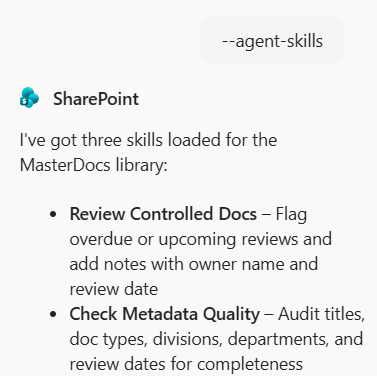
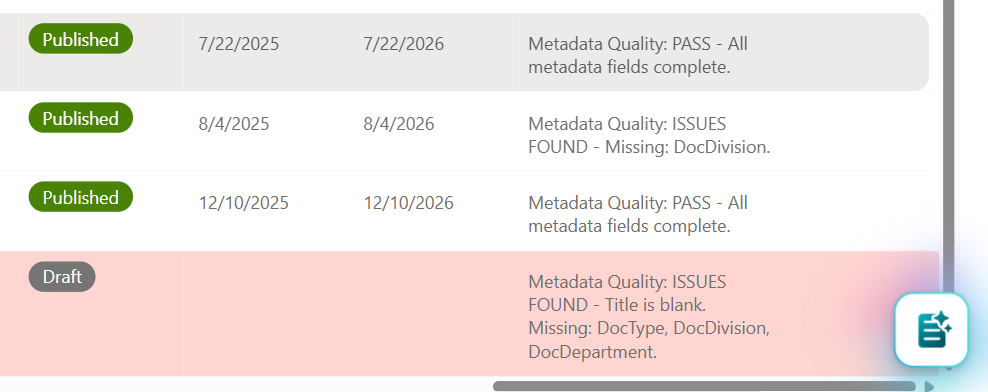
I created a second skill for the demo above to assess the quality of metadata in the document library. This skill rates the quality based on metadata fields being populated or not. If a document has never been published, then it won’t have a published or review date, but it does need to have other metadata. Here’s the output.
Skill files are Markdown format and can be created or edited manually or via the SharePoint AI chat. This makes it possible to create a Skill and copy the files to multiple sites, which might be useful for project sites or others where you have many sites built off the same template.
I tried a few things with Skills that didn’t work. At this stage at least, the Agent cannot access permission or sharing information in SharePoint. I also tried creating items in Planner but this didn’t work, so if you want to create a task list, at this stage it will require Power Automate to create the tasks. This results in a Skill being created that doesn’t work, so I did the following to remove the specific Skill, I used the following prompt:
- –Agent-skills
- Remove the <skill name> skill
This gives a list of the available skills and then I used the name of the Skill I wanted to delete. You are prompted to confirm before the Skill file is deleted.
The use cases for skills are endless. Almost any task that involves reviewing content, tagging metadata, assigning actions etc can be done with a Skill.
Learn more about extending AI in SharePoint.
Discover more from SharePoint Moments
Subscribe to get the latest posts sent to your email.
